| Max Ingredients to Show on Report | Enter the number of ingredients that you want to display for each well. |
| Show Protein Name | When selected, the protein name will appear for each well. |
| Show Drop Volumes | When selected, the drop volume will appear for each well. |
| Show Well Volumes | When selected, the well volume will appear for each well. |
| Show Column Name Heading | When selected, column name headings will appear in the report. |
| Fit to Page | Here you can specify how many rows and columns will appear on each page of the report. If you select Fit to Page, the entire plate will be printed on one page. To limit the number of wells printed on each page, deselect the Fit to Page checkbox and enter values in the Rows and Columns boxes. |
| Ingredient Name Options | Select either Long Ingredient Name or Short Ingredient Name to appear in each well |
| Ingredient Data Options | Select the ingredient attributes that you want to appear for each well such as Concentration, pH, and pH Volumes. |
| Advanced Font Settings | Click this button to make changes to the default font settings for the report. |
 in the Report tab on the Experiment contextual tab set.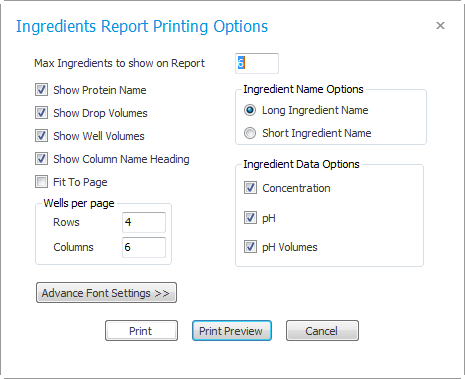
Show me more about printing options
 at the top of the preview window.